Good enough collision resolution
Physics is one of the hardest things to get right in a videogame. There are a lot ways to detect and respond to collisions, and you’ll find no shortage of complicated math and half-baked solutions scattered across the Web. I don’t claim that my solution is any better, but it’s easy to understand, easy to implement, and it’s good enough for small projects.
The problem
Before explaining my solution, the problem must be explained. I want to resolve collisions involving 2D shapes on a flat plain that do not rotate. Before a collision can be resolved, it must first be detected. One of the easiest ways to do that is to use the AABB (axis-aligned bounding box) method. In Lua, it looks like this:
function detect_collision(box_a, box_b)
  local result = false

  if box_a.x + box_a.width > box_b.x and
     box_a.x < box_b.x + box_b.width and
     box_a.y + box_b.height > box_b.y and
     box_a.y < box_b.y + box_b.height then

     result = true
  end

  return result
end
The function above requires that both box_a and box_b have x, y, width and height properties. If any part of box_a overlaps with box_b, all of the conditions return true, and the result of the function is true. Here’s a picture showing what that looks like.
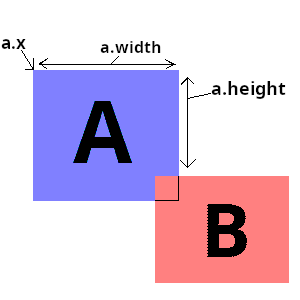
Detecting the overlap is the easy part. How do we push box_a out of box_b?
My solution
A common goal is to correct the position of box_a on both the X and Y axes at the same time. But which one do you correct first? X or Y? And how do you make one object slide against another? I’ve wasted countless hours trying to figure this out. Every time I got close to a perfect solution, I found something that easily broke it. Then I had an idea: Instead of trying to resolve collisions in all 4 directions, just do it in 2. This means assigning every object a “wall type”. If it’s a horizontal wall, only resolve above and below on the Y axis. If it’s a vertical wall, only resolve on the X axis.
Here’s what the solution looks like in Lua.
function resolve_collision(box_a, box_b)
  if box_b.wall_type == 'horizontal' then
    if box_a.y < box_b.y + (box_b.height / 2) then
      box_a.y = box_b.y - box_a.height
    else
      box_a.y = box_b.y + box_b.height
    end
  elseif box_b.wall_type == 'vertical' then
    if box_a.x < box_b.x + (box_b.width / 2) then
      box_a.x = box_b.x - box_a.width
    else
      box_a.x = box_b.x + box_b.width
    end
  end
end
The above solution works for objects where the origin (the point from which an object is drawn/manipulated) is in the upper-left corner, which is usually the case. There are some limitations to this approach, but there are plenty of workarounds. For a lot of objects that span the entire length or width of the screen, setting the wall_type property of an object is enough. This may also be sufficient for small objects like bricks, missiles, bullets, etc.
For larger objects that have space around them, the “fat-cross” approach works pretty well. Instead of just setting the wall_type property of an object, a pair of invisible hit boxes is attached in such a way that they overlap. The goal here is to ensure that a moving object (hedgehog, missle, bullet, etc) hits only one hitbox at a time. Below is a diagram of an object with overlapping X and Y hit boxes.
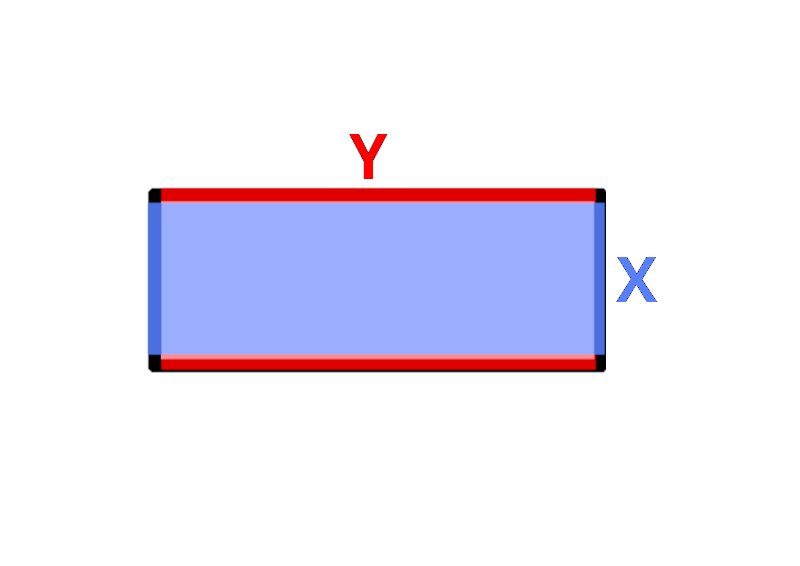
Depending on the speed of the colliding object, the dimensions of the hit boxes may need to be changed. Other than that, this solution is easy to implement and works well.